أبلغ أحد العملاء أن استبدال شريحة إرسال COFDM لم ينجح.
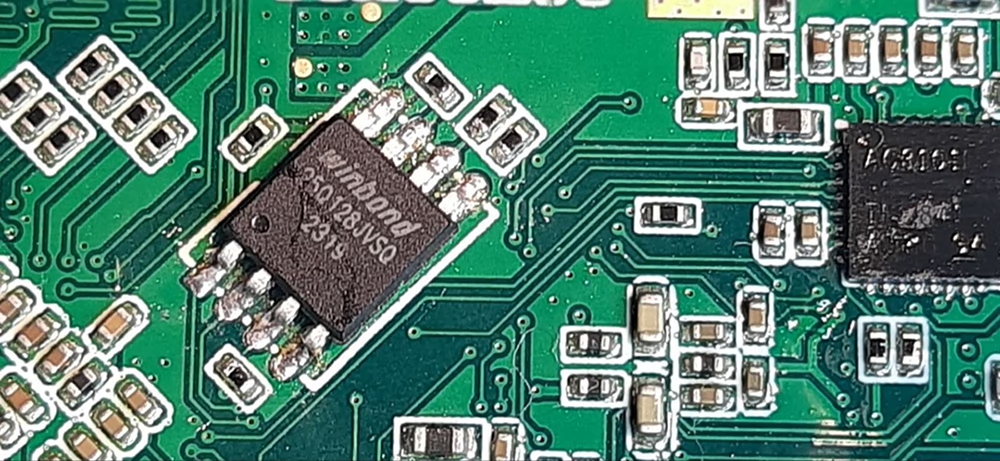
نواجه مشكلة في نموذجي وحدة Tx. بدءًا, لم تتمكن الوحدة من حفظ الإعدادات الجديدة, على الرغم من أن ميزاته الأخرى تعمل بشكل جيد. تذكرت أنك نصحتني سابقًا باستبدال شريحة الذاكرة W25Q128JVSIQ في موقف مماثل. اليوم, قمنا باستبدال الرقاقة في عينتين من TX بعينة جديدة من السوق, ولكن بعد الاستبدال, لم يعد بإمكان TX الاتصال عبر UART.
لم ينجح استبدال شريحة إرسال COFDM
نشكرك على تحديثك بخصوص نموذجي وحدة TX.
ملخص المشكلة:
بدءًا, فقدت كلتا وحدتي TX القدرة على حفظ الإعدادات الجديدة, بينما ظلت الوظائف الأخرى طبيعية. بناء على الخبرة السابقة, استبدال شريحة ذاكرة الفلاش الموجودة على متن الطائرة (W25Q128JVSIQ) كان حلا صالحا.
لكن, بعد استبدال الشريحة بوحدات جديدة من السوق, لم تعد وحدات TX قادرة على إنشاء اتصالات UART. يشير هذا إلى مشكلة أعمق تتجاوز استبدال الأجهزة.
التحليل الفني:
ذاكرة فلاش فارغة من المحتمل أن تكون شرائح W25Q128JVSIQ المثبتة حديثًا فارغة ولا تحتوي على البرامج الثابتة الأصلية, محمل الإقلاع, أو بيانات التكوين. → بدون هذه البيانات, لا يمكن تهيئة النظام بشكل صحيح, وفشل اتصال UART.
معلمات التهيئة مفقودة إعدادات UART (معدل الباود, بروتوكول, إلخ.) غالبا ما يتم تخزينها في فلاش. إذا كانت هذه مفقودة, قد لا تستجيب الوحدة لأوامر UART.
توافق الشريحة أو مشكلات الجودة إذا كانت الشرائح البديلة من مصدر غير معروف أو غير رسمي, وقد يختلفان في التوقيت, التسامح الجهد, أو التعرف على الهوية. → يرجى التأكد من أن الرقائق أصلية W25Q128JVSIQ من مورد موثوق به.
لحام أو الأعطال الكهربائية لحام ضعيف, منصات التالفة, أو قد تتسبب بقايا التدفق في اتصال SPI غير مستقر بين MCU وشريحة الفلاش.
سلوك محمل الإقلاع تتحقق بعض الأنظمة من محتوى الفلاش أو معرف الشريحة أثناء بدء التشغيل. إذا كان الفلاش فارغًا أو غير معروف, قد يتوقف النظام قبل تمكين UART.
الإجراءات الموصى بها:
استعادة البرامج الثابتة إذا كانت شرائح الفلاش الأصلية لا تزال قابلة للقراءة, نوصي بعمل نسخة احتياطية لمحتوياتها وإرسال نفس البيانات إلى الشرائح الجديدة قبل التثبيت.
استخدم الرقائق المبرمجة مسبقًا إذا كان النسخ الاحتياطي غير متوفر, يرجى الاتصال بنا للحصول على صورة البرامج الثابتة الصحيحة والتعليمات الوامضة.
تحقق من مصدر الشريحة وطرازها تأكد من أن الرقائق البديلة أصلية من طراز W25Q128JVSIQ وليست من النوع المماثل (على سبيل المثال, W25Q128JVMIQ).
فحص جودة اللحام استخدم المجهر للتحقق من برودة المفاصل أو السراويل القصيرة. تأكد من أن خطوط SPI سليمة كهربائيًا.
يرجى إعلامنا إذا كنت بحاجة إلى دعم بشأن وميض البرامج الثابتة أو مزيد من التشخيص. يسعدنا أن نساعدك في استعادة الوظائف الكاملة لوحدات TX الخاصة بك.

اطرح سؤالاً
شكرًا لردكم ✨