A client reports that replacing the COFDM transmitter chip didn’t work.
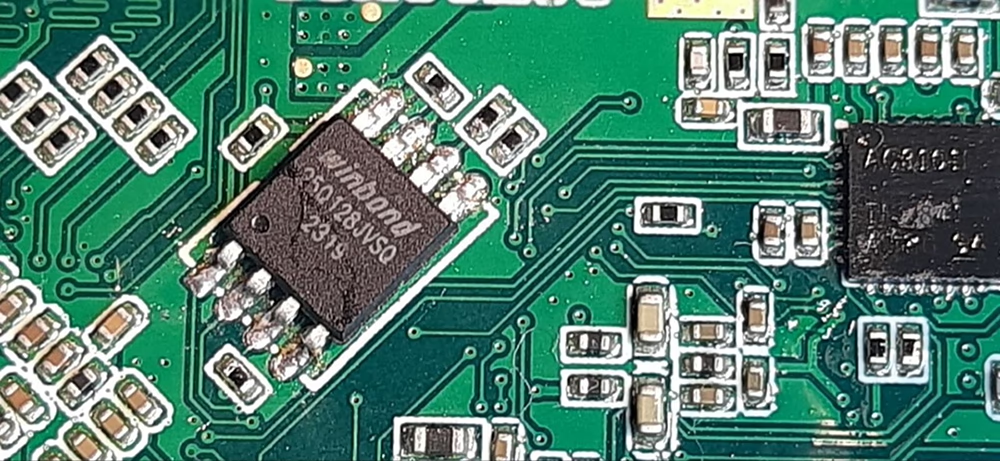
We’re experiencing an issue with the two Tx module samples. Initially, the module could not save new settings, even though its other features worked well. I recalled that you previously advised me to swap out a W25Q128JVSIQ memory chip in a similar situation. Today, we swapped out the chip in two TX samples with a new one from the market, but after the replacement, the TX could no longer connect via UART.
جایگزینی تراشه فرستنده COFDM کار نکرد
Thank you for your update regarding the two TX module samples.
Problem Summary:
Initially, both TX modules lost the ability to save new settings, while other functions remained normal. Based on previous experience, replacing the onboard flash memory chip (W25Q128JVSIQ) was a valid solution.
هر چند, after replacing the chip with new units from the market, the TX modules can no longer establish UART connections. This indicates a deeper issue beyond hardware replacement.
Technical Analysis:
Blank Flash MemoryThe newly installed W25Q128JVSIQ chips are likely empty and do not contain the original firmware, bootloader, or configuration data. → Without this data, the system cannot initialize properly, and UART communication fails.
Missing Initialization ParametersUART settings (نرخ بادی, پروتکل, و غیره.) are often stored in flash. If these are missing, the module may not respond to UART commands.
Chip Compatibility or Quality IssuesIf the replacement chips are from an unknown or unofficial source, they may differ in timing, voltage tolerance, or ID recognition. → Please confirm the chips are genuine W25Q128JVSIQ from a trusted supplier.
Soldering or Electrical FaultsPoor soldering, damaged pads, or flux residue may cause unstable SPI communication between the MCU and flash chip.
Bootloader BehaviorSome systems verify flash content or chip ID during startup. If the flash is blank or unrecognized, the system may halt before enabling UART.
Recommended Actions:
Firmware RestorationIf the original flash chips are still readable, we recommend backing up their contents and flashing the same data to the new chips before installation.
Use Pre-programmed ChipsIf backup is unavailable, please contact us for the correct firmware image and flashing instructions.
Verify Chip Source and ModelEnsure the replacement chips are authentic W25Q128JVSIQ and not a similar variant (به عنوان مثال, W25Q128JVMIQ).
Inspect Soldering QualityUse a microscope to check for cold joints or shorts. Confirm SPI lines are electrically sound.
Please let us know if you need support with firmware flashing or further diagnostics. We’re happy to assist in restoring full functionality to your TX modules.

یک سوال بپرسید
از پاسخ شما سپاسگزاریم. ✨