Klientas praneša, kad „COFDM“ siųstuvo lusto pakeitimas neveikė.
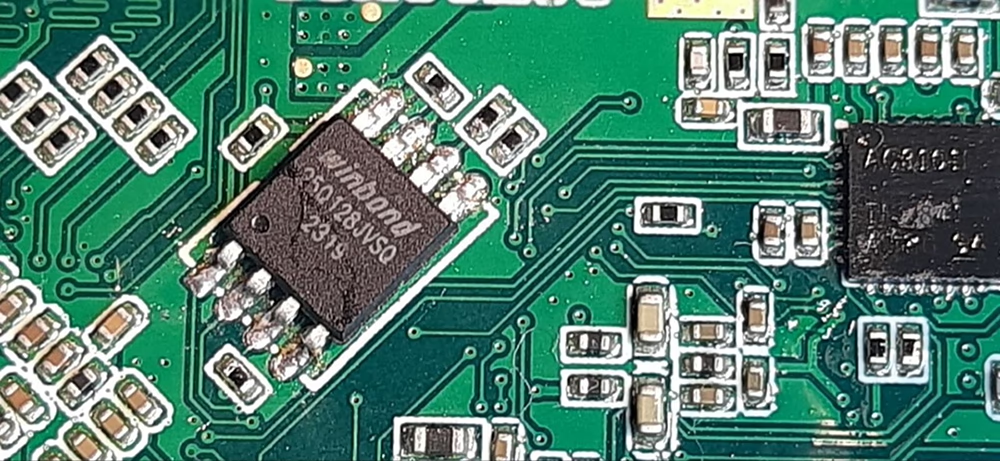
We’re experiencing an issue with the two Tx module samples. Initially, the module could not save new settings, even though its other features worked well. I recalled that you previously advised me to swap out a W25Q128JVSIQ memory chip in a similar situation. Today, we swapped out the chip in two TX samples with a new one from the market, but after the replacement, the TX could no longer connect via UART.
„COFDM“ siųstuvo lusto pakeitimas neveikė
Thank you for your update regarding the two TX module samples.
Problem Summary:
Initially, both TX modules lost the ability to save new settings, while other functions remained normal. Based on previous experience, replacing the onboard flash memory chip (W25Q128JVSIQ) was a valid solution.
Tačiau, pakeitus lustą naujais agregatais iš rinkos, TX moduliai nebegali užmegzti UART jungčių. Tai rodo gilesnę problemą, ne tik aparatūros pakeitimą.
Technical Analysis:
Tuščia „Flash“ atmintis Naujai įdiegti W25Q128JVSIQ lustai greičiausiai yra tušti ir juose nėra originalios programinės įrangos, įkrovos įkroviklis, arba konfigūracijos duomenis. → Be šių duomenų, sistema negali tinkamai inicijuoti, ir UART ryšys nepavyksta.
Trūksta inicijavimo parametrų UART nustatymai (perdavimo sparta, protokolas, ir tt) dažnai saugomi blykste. Jei šių trūksta, modulis gali nereaguoti į UART komandas.
Lustų suderinamumo ar kokybės problemos Jei pakaitiniai lustai yra iš nežinomo ar neoficialaus šaltinio, jų laikas gali skirtis, įtampos tolerancija, arba ID atpažinimas. → Patvirtinkite, kad lustai yra originalūs W25Q128JVSIQ iš patikimo tiekėjo.
Litavimo arba elektros gedimaiPoor soldering, damaged pads, or flux residue may cause unstable SPI communication between the MCU and flash chip.
Bootloader BehaviorSome systems verify flash content or chip ID during startup. If the flash is blank or unrecognized, the system may halt before enabling UART.
Recommended Actions:
Firmware RestorationIf the original flash chips are still readable, we recommend backing up their contents and flashing the same data to the new chips before installation.
Use Pre-programmed ChipsIf backup is unavailable, please contact us for the correct firmware image and flashing instructions.
Verify Chip Source and ModelEnsure the replacement chips are authentic W25Q128JVSIQ and not a similar variant (Pvz., W25Q128JVMIQ).
Inspect Soldering QualityUse a microscope to check for cold joints or shorts. Confirm SPI lines are electrically sound.
Please let us know if you need support with firmware flashing or further diagnostics. We’re happy to assist in restoring full functionality to your TX modules.

Užduoti klausimą
Jūsų pranešimas išsiųstas