
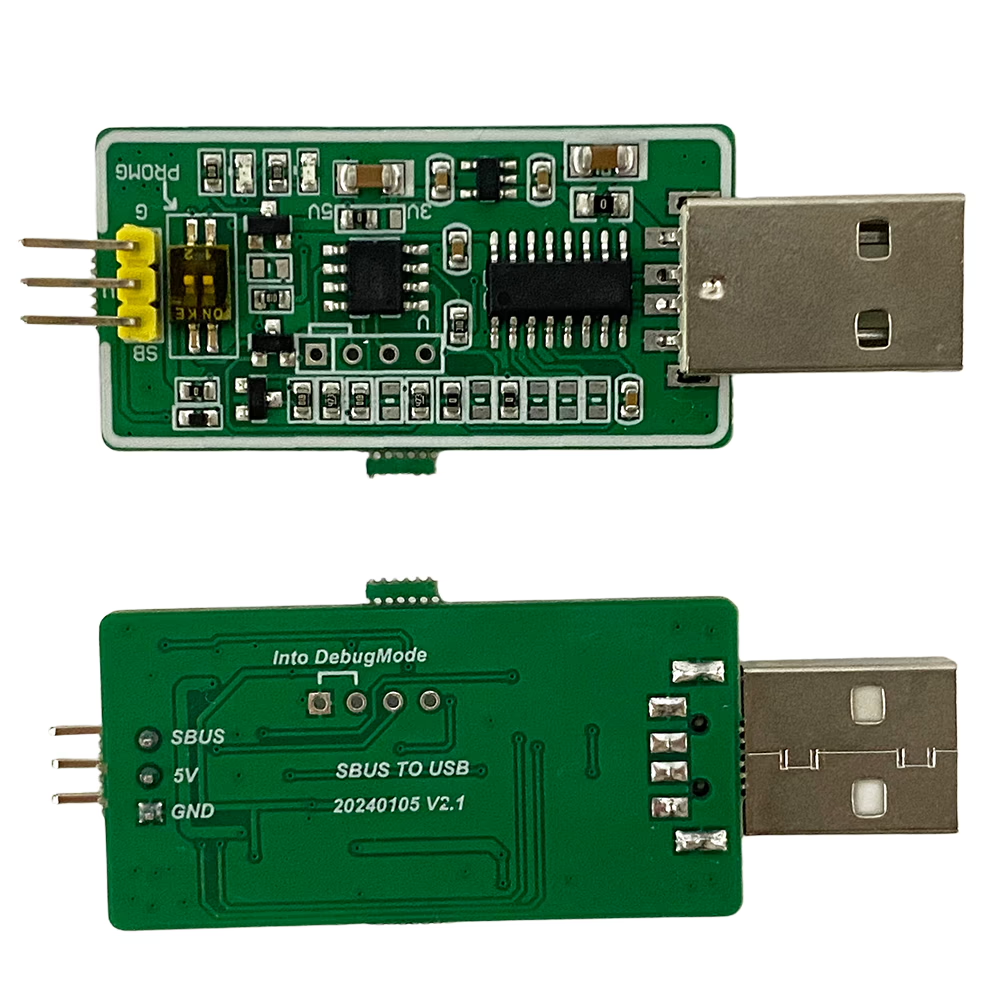
USB to SBUS Converter | SBUS to USB Adapter for RC, UAV and Industrial Control
Description
Professional USB to SBUS / SBUS to USB Converter Module designed for RC, UAV, flight controller, robotics, and industrial control applications.
This converter bridges RC SBUS signals and USB-based systems, converting non-standard SBUS communication into standard USB UART communication.
It supports:
- SBUS
- SBUS2
- IBUS
- WBUS protocols
Advanced versions provide:
- Adjustable baud rate
- Adjustable frame rate
- Integrated SBUS encoding and decoding
- Data checksum verification
This allows SBUS devices to communicate directly with PCs, microcontrollers, UART devices, wireless data links, and industrial control systems.
Overview
Unlike simple SBUS adapters, this module handles:
- Electrical level conversion
- SBUS protocol parsing
- UART communication conversion
- Frame timing control
- Optional SBUS encoding/decoding
After conversion, SBUS can be used like a standard serial communication interface without requiring users to manually process complex SBUS timing and frame structures.
Typical applications include:
- UAV flight controller development
- RC receiver signal monitoring
- Wireless telemetry extension
- Industrial automation control
- UART network control systems
Key Features
Bidirectional USB ↔ SBUS Conversion
Supports:
- SBUS to USB
- USB to SBUS
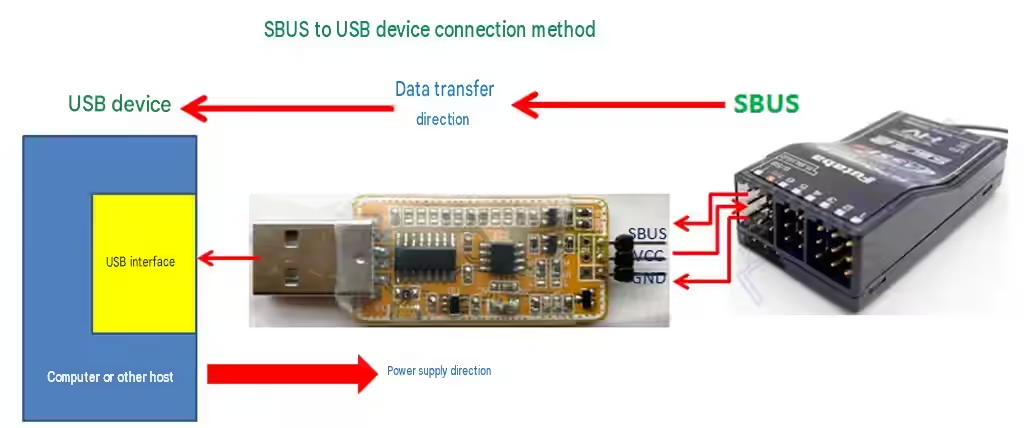
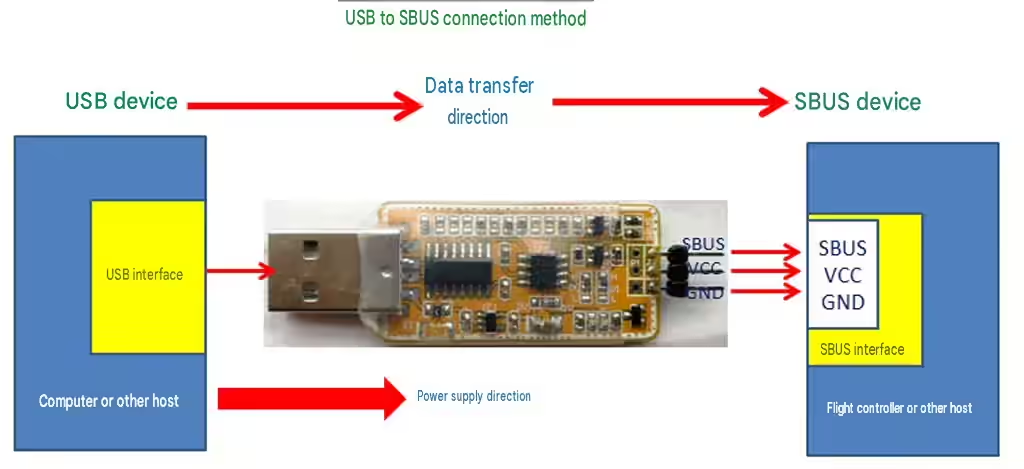
The module works as a USB virtual COM port device, allowing direct communication with PC software.
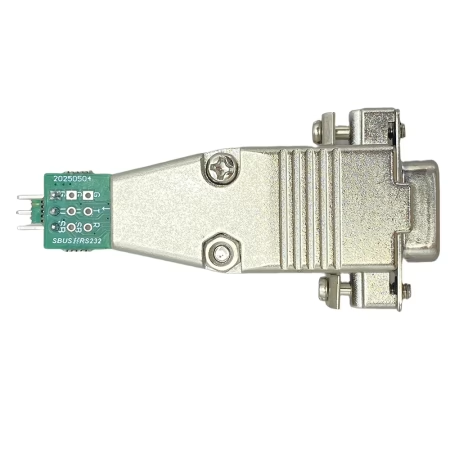
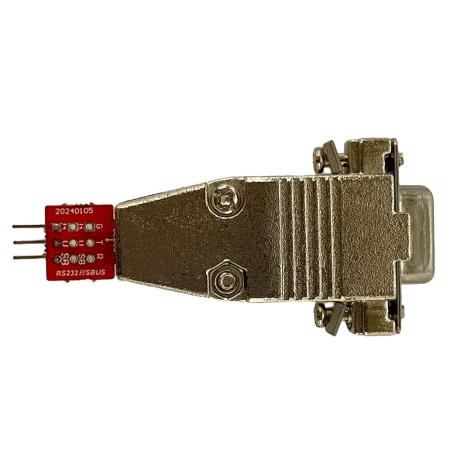
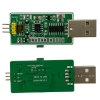
Available hardware:
- Direct USB Type-A plug version (no USB cable required)
- USB cable extension version
Supports Multiple RC Protocols
Compatible with:
- Standard SBUS
- SBUS2
- IBUS
- WBUS
Suitable for many RC receivers and UAV control systems.
Adjustable USB UART Baud Rate
The original SBUS protocol uses a non-standard UART format:
- 100 kbps
- 1 start bit
- 2 stop bits
- Even parity
This is difficult for many computers and microcontrollers to process directly.
The adjustable baud rate version converts SBUS into standard UART communication:
Available baud rates:
- 9600
- 38400
- 57600
- 115200
Output format:
- 1 start bit
- 1 stop bit
- No parity
Compatible with:
- PCs
- Microcontrollers
- UART data radios
- Network devices
Adjustable Frame Rate Control
SBUS normally sends data frames continuously with a short interval.
For USB, wireless links, or long-distance communication systems, excessive frame rates may cause:
- Buffer overflow
- Packet congestion
- Data loss
The adjustable frame rate version allows users to configure the frame interval:
10ms – 500ms
This improves compatibility with:
- Wireless serial links
- USB extension systems
- Long-distance control applications
Integrated SBUS Encoding & Decoding (Optional)
The codec version integrates SBUS protocol processing.
Functions:
SBUS Decoding
Converts SBUS frames into readable channel values:
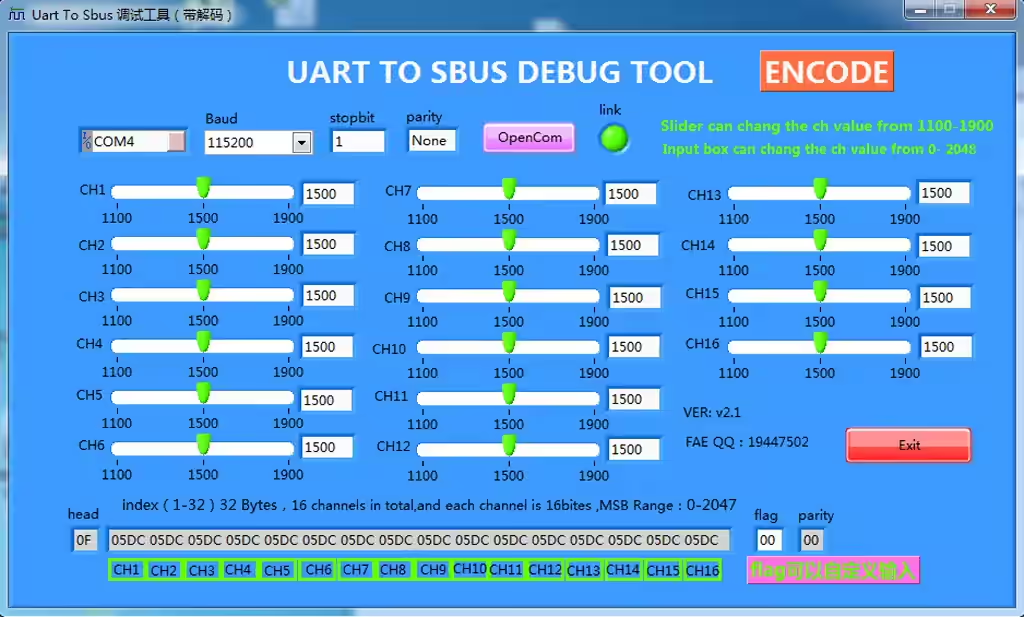
- 16 channels
- Integer output
- Range: 0–2047
The host system does not need to decode SBUS manually.
SBUS Encoding
Converts standard serial data into SBUS output.
Useful for:
- Flight controller development
- RC signal generation
- UAV control systems
Data Integrity Protection
Standard SBUS protocol does not include checksum verification.
For wireless transmission, long cables, or network communication, data errors may occur.
The codec version adds:
- XOR checksum verification
Improving reliability for:
- Wireless control links
- USB extension systems
- Long-distance communication
Specifications
Interface
USB Interface
- USB 2.0
- CDC Virtual COM Port
SBUS Interface
- Standard RC SBUS signal
Communication Parameters
SBUS Input
- Baud rate: 100 kbps
- Start bit: 1
- Stop bits: 2
- Parity: Even
USB UART Output
Selectable baud rate:
- 9600
- 38400
- 57600
- 115200
Format:
- 1 start bit
- 1 stop bit
- No parity
Frame Information
Standard SBUS:
- Frame length: 25 bytes
- 16 channels
Decoded output:
- Frame length: 35 bytes
- 16 channel values
- Flags
- XOR checksum
Mechanical Dimensions
Direct USB Plug Version
Size:
40 × 20 mm
Features:
- Built-in USB Type-A connector
- Plug directly into PC USB port
USB Cable Version
Size:
55 × 32 mm
Features:
- External USB cable included
- Suitable for desktop computers and test environments

Configuration Options
Please select the correct configuration before ordering.
Different versions provide different firmware functions.
Basic (100K SBUS Transparent)
100K baud rate SBUS transparent transmission.
Recommended for standard SBUS receiver communication.
Adjustable Baud Rate
Converts SBUS into standard UART communication.
Supports:
9600 / 38400 / 57600 / 115200 baud rates.
Baud Rate + SBUS Encoding
Includes:
- Adjustable baud rate
- Integrated SBUS encoding
Suitable for systems requiring SBUS output generation.
Baud Rate + Frame Rate Control
Includes:
- Adjustable baud rate
- Adjustable SBUS frame interval
Recommended for wireless and long-distance communication systems.
Full Version (All Functions)
Includes:
- Adjustable baud rate
- Adjustable frame rate
- SBUS encoding
- SBUS decoding
- XOR checksum verification
Recommended for professional UAV, RC, and industrial applications.
Applications
- USB to SBUS adapter for RC receivers
- SBUS to USB interface for PC debugging
- UAV flight controller development
- RC signal monitoring
- SBUS extension through USB or wireless UART
- Industrial control via USB UART
- Robotics communication systems
FAQ
Q: Is this a USB to SBUS or SBUS to USB device?
A: It supports both directions. The module works as a bidirectional USB ↔ SBUS converter.
Q: Can I connect an SBUS receiver directly to a PC?
A: Yes. The module converts SBUS signals into USB serial communication, allowing direct PC connection.
Q: Does it support SBUS2?
A: Yes. The upgraded version supports SBUS2 protocol.
Q: Which version should I choose?
- For simple SBUS monitoring: Basic Version
- For MCU/UART applications: Adjustable Baud Rate Version
- For wireless or long-distance links: Frame Rate Control Version
- For professional UAV applications: Full Version
Q: Does the SBUS-to-USB converter output raw SBUS frames over a standard Linux serial interface?
A: Yes. The converter uses a CH340 USB-to-serial interface and appears as a standard virtual serial port on the computer.
In raw mode, the SBUS data is not decoded or modified. The data received from the SBUS input is output through the USB serial port as the original SBUS data stream. For standard SBUS, this means the original 25-byte SBUS frames are transmitted to the serial port.
It does not appear as a USB joystick or HID device.
Q: Will the converter work with Linux?
A: Yes. The CH340 USB-to-serial interface supports Linux and other major operating systems. On many relatively recent Linux distributions, the required CH340 driver is already included in the Linux kernel. If the device is not automatically recognized, the appropriate CH340 driver can be installed manually.
Official WCH CH340 driver page: https://www.wch.cn/products/CH340.html
Q: What device name will the converter use in Linux?
A: After the CH340 driver is recognized, the converter normally appears as a standard serial device, for example: /dev/ttyUSB0
The exact device name may vary depending on the Linux system and the other USB devices connected.
Q: Does the converter require a proprietary Linux driver?
A: No proprietary application or special interface is required. The converter uses the standard CH340 USB-to-serial interface.
If the Linux system already includes the CH340 driver, no additional driver installation is normally required. Otherwise, the standard CH340 driver can be installed.
Q: Can I parse the raw SBUS frames myself?
A: Yes. This is supported in the raw-data mode.
The converter passes the SBUS input data directly to the USB serial interface, allowing your own Linux software or simulator to read and parse the original SBUS frames.
Q: Does the converter decode SBUS channels internally?
A: It can support different output modes depending on the product configuration. For applications that require the original SBUS data, use the raw mode. In this mode, the output consists of the original 25-byte SBUS frames. A separate decoded-data mode can output a 35-byte data stream, but this is not required when your software needs to parse the original SBUS frames itself.
Q: Is a Linux GUI debugging application provided?
A: We currently provide a Windows debugging/configuration tool. A dedicated Linux GUI application is not currently provided. However, this is generally not necessary for applications that only need to access the SBUS data, because the converter operates as a standard USB serial device under Linux.
Q: Should I choose the version with the built-in SBUS decoder?
A: It depends on your PC software. If you develop your own PC application, we recommend the version with the built-in decoder. It outputs decoded SBUS data in a 35-byte format, making it easier for your software to process. If you use a third-party PC application, we recommend the version without the built-in decoder, because third-party software may require the original SBUS protocol data.
Q: Can the built-in decoder be disabled?
A: No. The decoder is integrated into the chip and is permanently configured during chip manufacturing. Users cannot enable or disable the decoder through software.
Q: What is the difference between the decoder and non-decoder versions?
A: SBUS is a compressed protocol. The non-decoder version outputs the original SBUS protocol data, while the decoder version automatically decodes the data and outputs the decoded 35-byte data format.
Q: Why is the baud rate adjustable?
A: The adjustable baud rate is designed to help reduce data errors that may occur at the standard 100 kbps baud rate. Users can select a suitable baud rate according to their application and communication environment.
Q: Why is the frame rate adjustable?
A: The adjustable frame rate helps solve serial data sticking or packet concatenation problems on the PC side. Adjusting the frame rate can make the received serial data easier for PC software to process correctly.
Q: Which version should I choose?
A:
| PC Software | Recommended Version |
|---|---|
| Your own/custom PC application | Built-in Decoder |
| Third-party PC application | Without Decoder |
| Need original SBUS protocol data | Without Decoder |
| Need decoded 35-byte data directly | Built-in Decoder |
Why Choose This USB to SBUS Converter?
✔ Designed specifically for USB ↔ SBUS conversion
✔ Handles protocol processing internally
✔ Supports SBUS2 / IBUS / WBUS
✔ Multiple firmware options available
✔ Suitable for UAV, RC, robotics and industrial systems
✔ Factory firmware customization and OEM support available
Factory Advantage
We specialize in:
- RC signal processing
- UAV communication solutions
- Wireless data transmission systems
- Embedded firmware development
Support:
- OEM / ODM customization
- Firmware modification
- Long-term technical support
Related Post
- USB to SBUS or SBUS to USB Converter Guide | RC UAV Adapter Configuration
- USB to SBUS or SBUS to USB User’s Manual https://cdn.isdb-t.com/pdf/usb-to-sbus-sbus-to-usb-manual-v3-english.pdf
- LabView 2012 Plugin Install Firstly: https://cdn.isdb-t.com/software/labveiw-2012-plugin.zip
- USB-To-SBUS and SBUS-To-USB Tool: https://cdn.isdb-t.com/software/usb2sbus-sbus2usb-tool.zip
- Official WCH CH340 driver page: https://www.wch.cn/products/CH340.html
- USB转SBUS和SBUS转USB模组中文使用说明书: https://cdn.isdb-t.com/pdf/usb-to-sbus-sbus-to-usb-manual-v3-chinese.pdf


Reviews
There are no reviews yet.